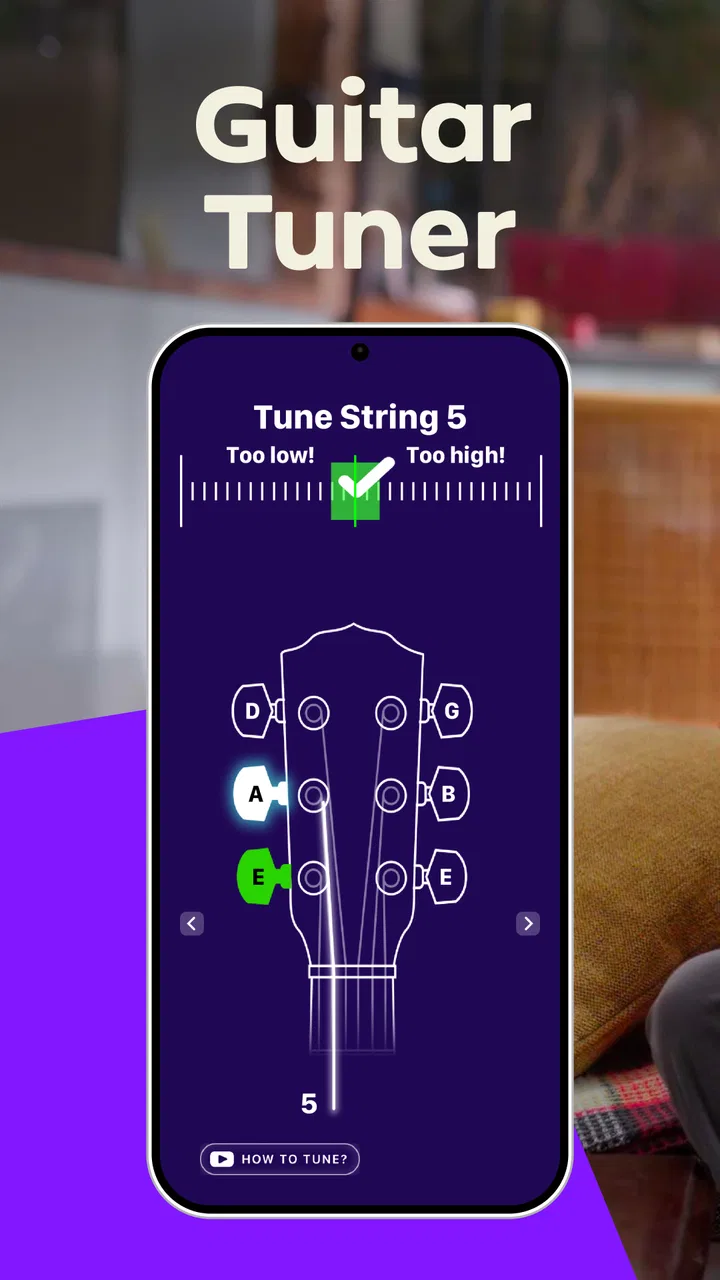
Guitar Tuner - Simply Tune
- 4.8
- Rating
- 500.00K
- Installs
- Free
- Price

 Analysis by App-foxy
I like a tuner that gets out of the way. When I pick up a guitar before work, sit down with a ukulele during a quiet evening, or check the low strings on a bass before rehearsal, I do not want a complicated music lesson wrapped around the basic job. Guitar Tuner - Simply Tune, developed by Simply Ltd, takes that straightforward approach. It is a free Music & Audio app for Android, rated for Everyone, and its main purpose is clear: help you tune string instruments with as little friction as possible.
After using it as a practical tuning companion, my impression is that it suits players who want a focused tool rather than a full practice platform. The app has a 4.8 average from around 41 thousand ratings, with more than 500 thousand installs, so it has clearly found an audience beyond absolute beginners. The current version is 1.5.7, and it runs on Android 6.0 or later. Those details matter because this is the kind of utility many people install once and expect to keep available whenever an instrument needs attention.
How the tuner feels in ordinary playing situations
The first useful quality is its narrow focus. Guitar Tuner - Simply Tune does not ask me to build a routine around it. I open it when a string sounds wrong, bring the instrument close to the phone, and use the pitch display to guide the adjustment. That makes it especially approachable for someone who knows how to turn tuning pegs but does not yet trust their ear enough to tune unaided.
You May Also Like

 Blood Strike: 2.5 Anniversary
Blood Strike’s Loadouts Turn Every Drop Into a Tactical Gamble
A close look at Blood Strike’s custom loadouts: how fast access to signature weapons reshapes its battle royale rhythm, rewards preparation, and narrows the gap between fights.

 Pandora - Music & Podcasts
Pandora’s Music Is Easy to Start, but Harder to Recover
Pandora’s strength is its low-effort path from a seed to a station. Its weak spot is how much confidence it asks you to place in connection, setup, and quiet recovery.

 8 Ball Pool
 Is Built on Rivalries, Rematches, and Routine
A close look at the rivalries, rematches, shared routines, and unanswered safety questions that turn a quick pool match into a persistent mobile community.

 Samsung Music
’s Quiet Strength Is Playing What You Already Own
Its reach comes less from spectacle than from dependable access to a personal library. That simplicity is both the app’s strongest retention engine and its ceiling.

 AccuWeather: Weather Radar
AccuWeather Review: A Quick, Clear Forecast for Everyday Decisions
For everyday plans, the best forecast is the one you can understand quickly. AccuWeather makes rain timing, radar, and local conditions easy to act on, with a few trade-offs.

 Hill Climb Racing
Why Hill Climb Racing Still Turns Crashes Into One More Run
A tiny car, a bumpy hill and one more upgrade: Hill Climb Racing keeps resurfacing because its simple chaos makes every near-miss feel personal.
More From Our News Desk
View All News


For guitar, ukulele, and bass players, the appeal is obvious. A phone is already nearby, and a dedicated physical tuner is easy to misplace. A general music app may offer a tuner somewhere inside a larger menu, while this app presents itself as a specialist tool. That difference is small on paper but meaningful in practice: when I am holding an instrument, I want to spend my attention on the strings, not on navigating through unrelated features.
The store presents it as a premium tuner with all features unlocked while remaining free to use. I see that positioning as a strong advantage for learners and casual musicians who do not want to pay before discovering whether a tuner fits their habits. It also makes the app more useful for households with several instruments. One person can use it for a guitar, another for a ukulele, and a bass player can keep it ready for lower strings without needing separate equipment.
Still, a phone tuner is not automatically better than every alternative. A clip-on tuner remains convenient in noisy rooms because it reads vibration through the instrument rather than relying only on the sound reaching the phone. A pedal tuner is more practical for a guitarist who needs to tune silently between songs on stage. Guitar Tuner - Simply Tune is strongest for home practice, lessons, songwriting sessions, and informal rehearsals where the phone can sit close enough to hear clearly.
What connectivity changes during a tuning session
The most important connectivity question is not whether the app feels modern; it is what happens when I am somewhere with an unreliable connection. The available product information does not establish an offline mode, so I would not plan an isolated trip around the assumption that every part of the experience will work without network access. Before leaving for a cabin, outdoor lesson, or venue with poor reception, I would open the app in advance and test the exact workflow I expect to use.
That small preparation step is more useful than treating network access as an afterthought. At home, on a normal connection, opening the tuner is unlikely to feel like a special event. In a basement rehearsal room or a crowded venue, however, a slow launch or interrupted service can become frustrating precisely when the instrument needs attention. I prefer to discover that before the first note rather than while other musicians are waiting.
Connectivity can also shape how comfortable the app feels in shared spaces. If the tuner starts promptly and responds smoothly, I can place the phone near the sound hole or speaker and make adjustments without much discussion. If the experience depends on loading something at the wrong moment, a simple tuning check becomes less discreet. That is why I consider a quick pre-session test part of using this app responsibly, especially when I cannot rely on a backup tuner.
I would also avoid assuming that network availability improves the accuracy of the pitch reading itself. Tuning accuracy depends on factors such as microphone placement, background noise, string condition, and how steadily the note is played. A connection may affect access to the app or its surrounding services, but it does not magically correct a noisy room. For the cleanest result, I mute neighboring strings, play one note at a time, and give the pitch a moment to settle before turning the peg.
Using it on the move without making the phone the weak link
Mobile use is where this tuner makes the most sense. I can keep a phone beside a guitar on a desk, place it on a chair during a lesson, or use it before a casual outdoor session without carrying another piece of equipment. That convenience is particularly valuable for ukulele players, because the instrument is often picked up spontaneously and may not have a dedicated tuner nearby.
There is a practical positioning trick that makes a bigger difference than many new users expect: the phone should be close enough to hear the note clearly, but not so close that the instrument blocks the screen or makes the display awkward to read. I prefer placing it slightly in front of the instrument, with the microphone facing the sound source and the screen visible from my playing position. That lets me adjust a peg and check the reading without repeatedly stopping to pick up the phone.
On bass, I take a slower approach. Low notes can take longer to stabilize, and a quick pluck may produce extra noise that confuses any microphone-based tuner. I pluck gently, let the note ring, and avoid touching other strings. This is not a criticism unique to Simply Tune; it is a limitation of using a phone in a real room. The app can be helpful, but it cannot eliminate the acoustic challenges of a large instrument and a noisy environment.
For a beginner, the best mobile workflow is to tune before practicing rather than waiting until the instrument sounds obviously wrong. I would check each string once, then repeat the first and last strings after making adjustments. That second pass catches the common problem of tension changes: tightening one string can slightly alter the feel of the neck and make another string need a small correction. The app becomes more useful when used as part of a calm routine instead of a frantic rescue.
Battery and screen comfort also matter during mobile sessions, even though they are easy to overlook. A tuner is not something I want to keep open for a long time, so I use it in short bursts and avoid leaving the display active while chatting or setting up equipment. If I am preparing for a longer rehearsal, I tune everything before the session begins and keep a physical fallback available when the phone is already busy with other tasks.
What to do when a reading looks wrong
The most common failure is not necessarily an app failure. It is often the environment. Air conditioning, conversation, television audio, and other instruments can all make a phone-based reading jump around. When that happens, I first mute every string except the one I am checking, move the phone closer, and play a single clean note. I do not turn the peg while the reading is still wandering.
If the display continues to behave strangely, I restart the process rather than making a large adjustment. I stop the note, check that the correct string is ringing, and pluck again more gently. This recovery method prevents a small detection problem from becoming an over-tightened string. It is especially important for beginners, who may interpret an unstable reading as a signal to keep turning.
Connectivity-related trouble needs a different response. If the app does not open as expected in a place with weak service, I would close other network-heavy activities, move to a spot with better reception, and retry before changing instrument settings. I would not keep turning strings based on memory or guesswork simply because the app is slow to become usable. A separate clip-on or pedal tuner is the better safety net for performances and rehearsals where a delay is unacceptable.
There is also a useful distinction between a bad reading and a difficult instrument. If one string repeatedly sounds unstable after careful plucking, the issue may be an old string, a problem with the bridge or nut, or a peg that does not hold tension. A tuner can show that the pitch is moving, but it cannot repair the hardware. In that situation, I use the app to confirm the symptom and then inspect the instrument rather than blaming the software.
Beginners sometimes ask whether the app can replace learning to tune by ear. In my view, it should support that skill, not replace it forever. After tuning, I play simple chords and listen for harsh beating or an obviously unsettled sound. The visual reading gives me a reliable starting point, while my ears tell me whether the instrument feels musically comfortable. That combination is more dependable than either method alone.
Being sensible about data and network use
Because this is a phone-based tool, I would treat data-conscious use as a practical habit rather than a reason to avoid it. The app is free, but free does not automatically mean that every surrounding service behaves the same way in every situation. I would review the app’s current device prompts and system settings during installation, and I would avoid assuming that network use is either extensive or nonexistent without checking how the app behaves on my own phone.
For people on limited mobile plans, the simplest approach is to use the tuner primarily on a trusted connection and test it before depending on it elsewhere. A short tuning session should not be confused with streaming music, but the important point is predictability. If I am about to travel, I open the app at home, confirm that the tuner is available, and make sure I know where to place the phone. That reduces the chance of discovering a connectivity problem when mobile data is the only option.
I also keep the app’s role separate from music playback. If I am tuning next to a streaming speaker, the speaker can interfere with the microphone and make the reading less stable. Pausing nearby audio is both data-conscious and acoustically sensible. It avoids unnecessary playback while giving the tuner a cleaner signal to work with.
Another overlooked trade-off is privacy and convenience in shared spaces. A phone used as a tuner may be placed on a table, floor, or music stand where other people can see incoming notifications. I turn on a quiet mode before a lesson or rehearsal, not because the tuner requires it, but because distractions can lead to missed readings and awkward interruptions. A focused screen also makes it easier to notice when the pitch has settled.
These habits do not make Guitar Tuner - Simply Tune a specialist stage system. They simply make the mobile experience more predictable. If a player needs guaranteed operation away from a connection, instant response in loud surroundings, or a device that does one job without competing for phone battery and attention, a hardware tuner remains the more dependable purchase.
Who will appreciate it most, and who should choose something else
I would recommend this app first to beginners, home musicians, students, and players who move between guitar, ukulele, and bass. Its free price removes an easy barrier, and the Everyone rating makes it suitable for a broad household audience. It is also a sensible backup for anyone who owns a physical tuner but occasionally forgets to bring it.
It is less convincing as the only tuner for a touring musician. A phone can be misplaced, muted, occupied by another task, or affected by a noisy environment. A clip-on tuner is usually better for acoustic practice in crowded rooms, while a pedal tuner is better for electric guitarists who need silent, repeatable tuning during a set. A studio musician who already owns a high-quality hardware tuner may gain convenience from this app but not necessarily a dramatic improvement in precision.
Compared with a general-purpose music education app, Simply Tune feels more direct. You do not need to work through lessons before reaching the instrument. Compared with a physical tuner, it is cheaper to start and easier to keep with you, but it gives up some independence from the phone and the surrounding environment. That is the central trade-off, and it should guide the decision more than the rating alone.
The strong user response is encouraging, with 664 written reviews alongside the larger rating total, but I still judge the app by the situation in which I plan to use it. A high average can tell me that many people find it useful; it cannot guarantee that a phone microphone will perform well beside a loud drummer or that the app will suit a professional stage workflow. For ordinary personal practice, however, its focused design is a real strength.
My connectivity verdict after using it as a daily utility
Guitar Tuner - Simply Tune works best when I treat it as a convenient mobile instrument tool, not as a complete replacement for every kind of tuner. It is free, focused, and broad enough to cover guitar, ukulele, and bass, which makes it easy to recommend to someone who wants a simple starting point. The current 1.5.7 release supports devices running Android 6.0 or later, so it is accessible to many owners of older Android phones as well as newer models.
My main advice is to prepare before relying on it away from home. Open it while connected, test the tuning routine, keep the phone near the instrument without blocking the microphone or display, and use a quiet environment whenever possible. If the session matters professionally or takes place somewhere with uncertain connectivity, bring a hardware tuner as backup. That is not a rejection of the app; it is a realistic response to the limits of phone-based tools.
For everyday practice, I would happily keep it installed. It turns the phone I already carry into a useful first line of defense when a string drifts out of tune, and it avoids the cost of buying a separate device immediately. The best reason to choose it is convenience with sensible expectations: use it for home sessions, lessons, songwriting, and casual rehearsals, while choosing dedicated hardware when speed, silence, ruggedness, or dependable operation matters more than portability.
In the end, this is a practical Music & Audio app from Simply Ltd rather than an elaborate musical ecosystem. That is exactly why it can work so well. I would recommend it to a friend who wants to tune without learning a complicated interface, provided that friend understands the connectivity and acoustic limitations of using a phone. For that audience, it is a useful, approachable companion that earns its place beside the instrument.
FAQs for Guitar Tuner - Simply Tune
01What is Guitar Tuner - Simply Tune, and what instruments does it support?
Guitar Tuner - Simply Tune is a mobile tuning app designed primarily for guitar players who want a quick way to check and adjust their instrument’s pitch. It generally supports standard guitar tuning and may include alternate tunings, depending on the version and platform. The app is also useful for beginners because it provides visual feedback rather than requiring advanced knowledge of music theory.
02How accurate is Guitar Tuner - Simply Tune compared with a physical tuner?
In practical use, Guitar Tuner - Simply Tune can provide sufficiently accurate tuning for practice, lessons, rehearsals, and casual performances when the phone’s microphone is working properly. Accuracy may be affected by background noise, nearby instruments, poor microphone quality, or strings that produce weak signals. For recording sessions or professional performances, you may still prefer a dedicated chromatic tuner.
03Does Guitar Tuner - Simply Tune work without an internet connection?
A tuner normally analyzes the sound captured by your device’s microphone, so the basic tuning function may work without an active internet connection after installation. However, certain features, advertisements, account services, or updates may require connectivity. If you plan to tune your guitar at a rehearsal space or outdoors, it is sensible to open the app beforehand and confirm that the tuner responds correctly in offline mode.
04Is Guitar Tuner - Simply Tune suitable for beginners?
Yes, the app is generally suitable for beginners because it offers a simpler alternative to tuning by ear. You pluck one string at a time and follow the on-screen indicator to determine whether the note is too high, too low, or close to the target pitch. New players should still learn the names of the strings and tune slowly to avoid tightening a string too far.
05Is Guitar Tuner - Simply Tune free, and does it contain advertisements or in-app purchases?
The availability of free features, advertisements, and optional purchases can vary between the Android and iOS versions and may change after updates. The core tuning function is often accessible without payment, while premium options may remove ads or unlock additional tuning tools. Before downloading, check the current store listing, permissions, subscription terms, and trial conditions to avoid unexpected charges.
Pros
- Accurate tuning for guitar and other common string instruments.
- Large note display is easy to read while playing.
- Works well for beginners and experienced musicians alike.
- Quick startup makes it convenient for short practice sessions.
- Helps develop a better ear by showing pitch deviations clearly.
Cons
- Some features may require a premium upgrade.
- Microphone access is necessary for tuning functionality.
- Background noise can affect detection accuracy.
- May include advertisements in the free version.
- Advanced musicians may prefer more detailed tuning controls.

Guitar Tuner - Simply Tune
Gallery